Showing posts with label Forms. Show all posts

Sunday, November 3, 2013

Infopath Anonymous Users

Things i have learnt from doing Forms with Anonymous Users


  • You have to have a Site Collection Template of Team. Note: Publishing template will not allow Anonymous Users to submit data in ANY WAY
  • Can only Submit forms through lists and using customizing form.
  • Items submitted by anonymous users can’t automatically trigger workflows
This is a great post by Guru Clayton Anonymous Forms

If you don't want to use customizing form option you will have to use code in your forms. 

Use this code in your submit button:

SPSecurity.RunWithElevatedPrivileges(delegate()
{
         this.Submit();
});

Hope you enjoy

Thursday, September 26, 2013

The following form template cannot be upgraded because it is not currently uploaded on this farm: urn:schemas-microsoft-com:office:infopath

Hi!

This problem took me some hours to figure out what was happening, so I wanna share with you who are reading, so you can take 10min to resolve!

Problem:  When uploading a form by Administrator-Approved From Template (Advanced) the following message appear:
Sorry, something went wrong
The following form template cannot be upgraded because it is not currently uploaded on this farm: urn:schemas-microsoft-com:office:infopath:
:-myXSD-2012-02-20T18-57-14
I have tried several things, like removing the Form in CA, retracting the Solution.
Note: When you upload a Form to CA it's creates a solution or a file called .wsp.

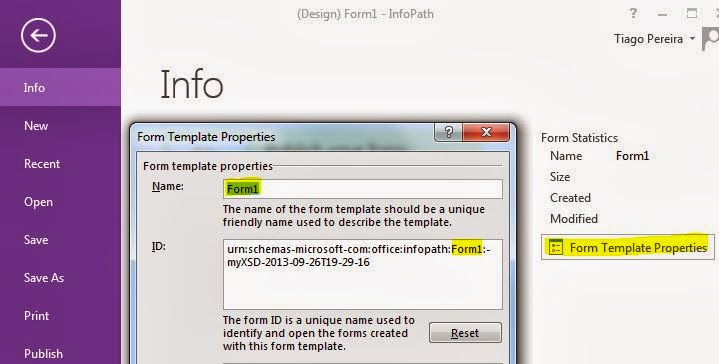
Well, my mistake was changing the Form Name in InfoPath, so Form ID change based on Form Name and the Form ID HAVE to be the same to get upgraded and not creating a new Form when uploading to CA.

Solution:

1- Verify the Form ID in InfoPath exemplified above and on CA-> General Application Settings -> Manage form templates -> (existing Form) view properties -> Form ID if they have the same exact characters ?
If yes go to step 3.

2- If they don't match, you have to edit the Form ID of the new Form in InfoPath and Upload back.

Although, this hasn't worked and same error appeared. May be because our Farm just had been upgraded to SharePoint 2013.

3- So I had to do one more step to get it working. Retracted the Solution of the old Form (CA -> System Settings -> Manage farm solutions -> Select solution with name beginning by "form-
") 

3.1 - Uploaded the new Form and it worked! No more alerts about it is not currently uploaded on this Farm.

Have a nice day!

Thursday, March 8, 2012

ContentTypes ou Tipos de conteúdo e InfoPath Forms/Formulários

Dúvida: Será que posso usar formulários com documentos, tudo na mesma biblioteca ?

Resposta: Sim, com algumas configurações, tanto na biblioteca como no formulário.

Os contenttypes/Tipos de conteúdo podem ser configurados de forma a salver formulários, e por sua vez podemos ter contenttypes e documentos, tudo numa biblioteca.
Como ?
1º Construir o formulário no InfoPath.
2º Publicar no InfoPath como tipo de conteúdo numa outra biblioteca qualquer, e depois adicionar o tipo de conteúdo do site à biblioteca do Sharepoint. Segue um link para ajudar muito bem explicado http://www.mikhaildikov.com/2008/05/sharepoint-folders-need-more-love.html
3º Podem ainda configurar o formulário para ser publicado na pasta respectiva, assim funciona como um documento. Sempre que é criado fica guardado na mesma localização. http://blogs.msdn.com/b/infopath/archive/2006/11/08/submitting-to-this-document-library.aspx

Desta forma, tenho documentos e formulários na mesma biblioteca, bem organizados com promoção de campos e tudo ;)

Mais informação útil aqui em inglês:
http://blogs.msdn.com/b/andrew_may/archive/2006/07/10/sharepointbeta2infopathformsincontenttypes.aspx

Monday, August 22, 2011

Can't open old/moved/copied forms - Permission problem Sharepoint

Problem: When opening a Form you get a message like this "A form template (.xsn) file can not be accessed. You may not have the required permissions to open the file."


Resolution: Can be permissions of course ... Otherwise can be a missing template.
If you deleted the template you have to restore or republish in order to open the Form.

;))