Hi!
This problem took me some hours to figure out what was happening, so I wanna share with you who are reading, so you can take 10min to resolve!
Problem: When uploading a form by
Administrator-Approved From Template (Advanced) the following message appear:
Sorry, something went wrong
The following form template cannot be upgraded because it is not currently uploaded on this farm: urn:schemas-microsoft-com:office:infopath:
I have tried several things, like removing the Form in CA, retracting the Solution.
Note:
When you upload a Form to CA it's creates a solution or a file called .wsp.
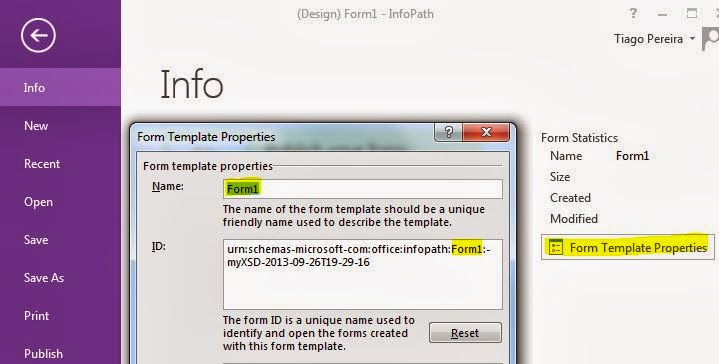
Well, my mistake was changing the Form Name in InfoPath, so Form ID change based on Form Name and the Form ID
HAVE to be the same to get upgraded and not creating a new Form when uploading to CA.
Solution:
1- Verify
the Form ID in InfoPath exemplified above and
on CA-> General Application Settings -> Manage form templates -> (existing Form) view properties -> Form ID if they have the same exact characters ?
If yes go to step 3.
2- If they don't match, you have to edit the Form ID of the new Form in InfoPath and Upload back.
Although, this hasn't worked and same error appeared. May be because our Farm just had been upgraded to SharePoint 2013.
3- So I had to do one more step to get it working.
Retracted the Solution of the old Form (CA -> System Settings -> Manage farm solutions -> Select solution with name beginning by "form-
3.1 - Uploaded the new Form and it worked! No more alerts about it is not currently uploaded on this Farm.
Have a nice day!