When trying to publish Form the following alert appear "The Following URL is not valid"
Solution:
After Googling and trying lots of things, I remembered my proxy was turned on at University...
Check if it's active, if so deactivate the proxy server at IE
Internet Options - > Connections - Lan settings - > "Proxy server" - deactivate the check boxes here
Have a great Day ;)
Showing posts with label InfoPath. Show all posts
Showing posts with label InfoPath. Show all posts
Thursday, July 17, 2014

Thursday, September 26, 2013
The following form template cannot be upgraded because it is not currently uploaded on this farm: urn:schemas-microsoft-com:office:infopath
Hi!
This problem took me some hours to figure out what was happening, so I wanna share with you who are reading, so you can take 10min to resolve!
Problem: When uploading a form by Administrator-Approved From Template (Advanced) the following message appear:
Sorry, something went wrongI have tried several things, like removing the Form in CA, retracting the Solution.
The following form template cannot be upgraded because it is not currently uploaded on this farm: urn:schemas-microsoft-com:office:infopath:
Note: When you upload a Form to CA it's creates a solution or a file called .wsp.
Well, my mistake was changing the Form Name in InfoPath, so Form ID change based on Form Name and the Form ID HAVE to be the same to get upgraded and not creating a new Form when uploading to CA.
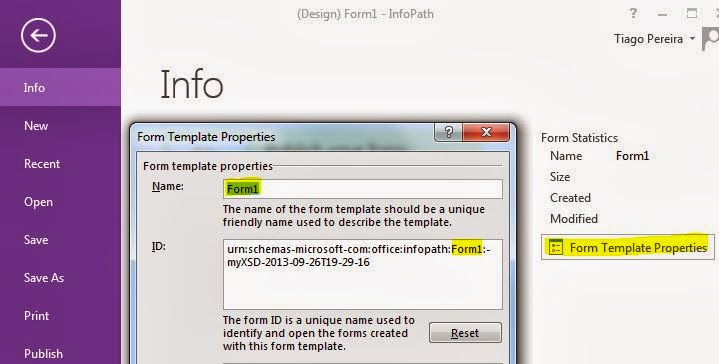
Solution:
1- Verify the Form ID in InfoPath exemplified above and on CA-> General Application Settings -> Manage form templates -> (existing Form) view properties -> Form ID if they have the same exact characters ?
If yes go to step 3.
2- If they don't match, you have to edit the Form ID of the new Form in InfoPath and Upload back.
Although, this hasn't worked and same error appeared. May be because our Farm just had been upgraded to SharePoint 2013.
3- So I had to do one more step to get it working. Retracted the Solution of the old Form (CA -> System Settings -> Manage farm solutions -> Select solution with name beginning by "form-
3.1 - Uploaded the new Form and it worked! No more alerts about it is not currently uploaded on this Farm.
Have a nice day!
Wednesday, April 21, 2010
Formulário não abre no Browser através de Workflow
Bom, hoje criei um workflow, no SharePoint Designer, e não estava conseguindo abri o formulário no browser.
O que faltava fazer no email era:
1- No Source - Current Item
2- No field - URL Absoluto codificado
URL Absoluto codificado retorna um .xml
A frente do .xml teremos que juntar "?OpenIn=Browser" e já está :)
Resultado seria qualquer coisa como:
http://Servidor/Biblioteca/Formulario.xml?OpenIn=Browser
;")
O que faltava fazer no email era:
1- No Source - Current Item
2- No field - URL Absoluto codificado
URL Absoluto codificado retorna um .xml
A frente do .xml teremos que juntar "?OpenIn=Browser" e já está :)
Resultado seria qualquer coisa como:
http://Servidor/Biblioteca/Formulario.xml?OpenIn=Browser
;")
Abrir InfoPath no Browser ou Internet Explorer
Para começar deve criar um formulário com compatibilidade para o browser.
1- Estruturar um modelo de formulário.
2- Colocar um visto em "Activar apenas funcionalidades com o browser
Quando o formulário tiver concluido é só publicar, mas na biblioteca temos que activar a opção para abrir no browser também.
1- Ir as definições da biblioteca de formulários
2- Em "Documentos com Suporte para Browser", selecionar a opção "Apresentar como página Web".
Pronto basta essas 2 opções para poder ver o formulário no browser :")
1- Estruturar um modelo de formulário.
2- Colocar um visto em "Activar apenas funcionalidades com o browser
Quando o formulário tiver concluido é só publicar, mas na biblioteca temos que activar a opção para abrir no browser também.
1- Ir as definições da biblioteca de formulários
2- Em "Documentos com Suporte para Browser", selecionar a opção "Apresentar como página Web".
Pronto basta essas 2 opções para poder ver o formulário no browser :")
Tuesday, April 20, 2010
Workflows parou de funcionar Erro 6875
Estava eu a testar os workflows com o Infopath e tudo funcionando direito...
Até que umas 2-3 horas depois os Workflows deixaram de funcionar....
Comecei a procurar...e tal..perdi uma tarde a procura e a fazer cenas..até cheguei a reparar o SharePoint...e tive que configurar de novo.
O erro no Event Viewer era
"Erro ao carregar e executar o receptor de eventos Microsoft.SharePoint.Publishing.Internal.PublishingWebEventReceiver em Microsoft.SharePoint.Publishing, Version=12.0.0.0, Culture=neutral, PublicKeyToken=71e9bce111e9429c. Abaixo encontram-se informações adicionais.
: Não existe um ficheiro com o URL 'Workflows/Workflow 1' nesta Web.
For more information, see Help and Support Center at http://go.microsoft.com/fwlink/events.asp."
Depois de tentar de tudo, mudei de conta já não sei para quê...e voâ-lá lol
Estava com login na conta de sistema...mudei para outra e os workflows começaram a funcionar.
:)
Até que umas 2-3 horas depois os Workflows deixaram de funcionar....
Comecei a procurar...e tal..perdi uma tarde a procura e a fazer cenas..até cheguei a reparar o SharePoint...e tive que configurar de novo.
O erro no Event Viewer era
"Erro ao carregar e executar o receptor de eventos Microsoft.SharePoint.Publishing.Internal.PublishingWebEventReceiver em Microsoft.SharePoint.Publishing, Version=12.0.0.0, Culture=neutral, PublicKeyToken=71e9bce111e9429c. Abaixo encontram-se informações adicionais.
: Não existe um ficheiro com o URL 'Workflows/Workflow 1' nesta Web.
For more information, see Help and Support Center at http://go.microsoft.com/fwlink/events.asp."
Depois de tentar de tudo, mudei de conta já não sei para quê...e voâ-lá lol
Estava com login na conta de sistema...mudei para outra e os workflows começaram a funcionar.
:)
Subscribe to:
Posts (Atom)