Showing posts with label errors. Show all posts

Sunday, November 3, 2013

Infopath Anonymous Users

Things i have learnt from doing Forms with Anonymous Users


  • You have to have a Site Collection Template of Team. Note: Publishing template will not allow Anonymous Users to submit data in ANY WAY
  • Can only Submit forms through lists and using customizing form.
  • Items submitted by anonymous users can’t automatically trigger workflows
This is a great post by Guru Clayton Anonymous Forms

If you don't want to use customizing form option you will have to use code in your forms. 

Use this code in your submit button:

SPSecurity.RunWithElevatedPrivileges(delegate()
{
         this.Submit();
});

Hope you enjoy

Error SharePoint Calculated Column Formulas

I was trying to create calculated column formulas in Site Column..

I realize that you can only do calculated column formulas in list column or by list columns...

Although, I found that initially when you creating Calculated Site Columns you can add formulas...

That's wierd but it took me several hours to find out.

Hope you enjoy you day.

I will leave a great combination of formulas here Calculated Formulas

Error The Managed Metadata Service or Connection is currently not available. The Application Pool or Managed Metadata Web Service may not have been started. Please Contact your Administrator

When accessing Managed Metadata Service the following message is prompt:

"The Managed Metadata Service or Connection is currently not available. The Application Pool or Managed Metadata Web Service may not have been started. Please Contact your Administrator"

I have done everything that i found on internet on Production and Quality SharePoint Environment and no solution worked for my Production Environment

What i have done:
  • Verify the “Managed Metadata Web Service” is "started". Reset several times..
  • Recreate the Service Application “Menaged Metadata Web Service”. Set full Permissions on and all others services account in hope it will work..but it didn't happen. It's not permissions issue.
  • Publish the same Service Application
  • Verify the Service Application Association have Managed Metadata Service is checked.
  • Dedicated Application Pool
  • Several iisresets

1 - Solution for Quality Environment: Create a new dedicated Application Pool 
  1. Go to Central Administration
  2. Click Application Management, then Manage Service Applications
  3. Select Managed Metadata Service and click Properties
  4. Create a new Application Pool


2 - Solution for Production Environment: Reattach Managed Metadata Database
This took me a harder solution.

  1. Go to SQL Server detach "Managed Metadata Database". Note: Select "Close Connection" option
  2. In Central Administration, Delete "Managed Metadata Service Application"
  3. Note: DO NOT Delete data associated with the Service Applications, You are deleting YOUR Database!!!
  4. Create a new Managed Metadata Service Application with a different name from the original DatabaseNote: Select the check-box "Add this service application to the farms default list".
  5. Take the newer database offline and close connections(At the end of this solution, this DB can be deleted)
  6. Do an attach of the original database
  7. At Central Administration, go to properties of managed Metadata and change the name to the original Database
  8. Do an iisreset


Thursday, September 26, 2013

The following form template cannot be upgraded because it is not currently uploaded on this farm: urn:schemas-microsoft-com:office:infopath

Hi!

This problem took me some hours to figure out what was happening, so I wanna share with you who are reading, so you can take 10min to resolve!

Problem:  When uploading a form by Administrator-Approved From Template (Advanced) the following message appear:
Sorry, something went wrong
The following form template cannot be upgraded because it is not currently uploaded on this farm: urn:schemas-microsoft-com:office:infopath:
:-myXSD-2012-02-20T18-57-14
I have tried several things, like removing the Form in CA, retracting the Solution.
Note: When you upload a Form to CA it's creates a solution or a file called .wsp.

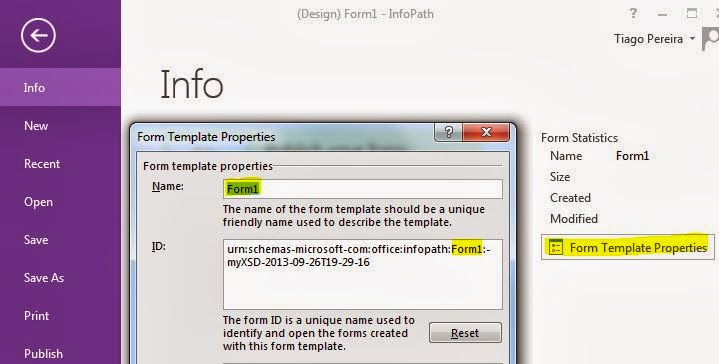
Well, my mistake was changing the Form Name in InfoPath, so Form ID change based on Form Name and the Form ID HAVE to be the same to get upgraded and not creating a new Form when uploading to CA.

Solution:

1- Verify the Form ID in InfoPath exemplified above and on CA-> General Application Settings -> Manage form templates -> (existing Form) view properties -> Form ID if they have the same exact characters ?
If yes go to step 3.

2- If they don't match, you have to edit the Form ID of the new Form in InfoPath and Upload back.

Although, this hasn't worked and same error appeared. May be because our Farm just had been upgraded to SharePoint 2013.

3- So I had to do one more step to get it working. Retracted the Solution of the old Form (CA -> System Settings -> Manage farm solutions -> Select solution with name beginning by "form-
") 

3.1 - Uploaded the new Form and it worked! No more alerts about it is not currently uploaded on this Farm.

Have a nice day!

Monday, September 16, 2013

SharePoint Designer Workflow running two times and only twice

Problem: SharePoint workflow is running two time everthing thing i do..

Solution: At the beginning of the workflow, add an action "Pause for duration" of 1 minute.

Friday, December 21, 2012

O site não é válido. Falta a biblioteca de documentos 'Páginas'.

Problem:  When activating a Feature the following message is shown

"O site não é válido. Falta a biblioteca de documentos 'Páginas'."

Solution: Open PowerShell and write these lines


$web = get-spweb http://sitecollection/subsite
$NewID = $web.Lists["Páginas"].ID
$web.AllProperties["__PagesListId"] = $NewID.ToString()
$web.Update()

Wait 5 minutes and check again. Note: If you check seconds later, the message still shows up. So wait a little bit more.

Wednesday, December 5, 2012

stsadm -o execadmsvcjobs


When deploying a Solution, Feature or Form a message is shown
"Solution XPTO is not being executed because the administration service on this server is not started. This job definition can be run manually using 'stsadm -o execadmsvcjobs'"

Solution:
1- Go to Services.msc on your server
2- Start the service called "windows sharepoint services administration" or  "SharePoint 2010 Administration". Depends on what version you have 2007 or 2010
3- Now your jobs gets executed in time.

Tuesday, November 27, 2012

Error you cannot input more than 255 characters MultiChoice Field


IF you have a field with values with more than 255 characters to a choice field and you add them all to your document, the following message is shown:

"you cannot input more than 255 characters"


Solution: Create a List with all the options of this field and modify the field on the Document Library to type Lookup. Select the checkbox "Allow unlimited length in document libraries"

Now you can have more than 255 characters in choice field.

This also works with the easylinkdocs Solution on codeplex http://easylinkdocs.codeplex.com/


Note: This only happen in document library. Not in custom lists.

Wednesday, November 21, 2012

SharePoint Error: Cannot import the Ad Rotator Web Part

When adding Ad Rotator Web Part to another Web App and error appear "Cannot import the Ad Rotator Web Part"

That's because the Solutions is not implemented in Central Administration.

Solution: 

1- Go to Central Administration
2- System Settings
3- Manage Farm Solutions
4- Select Solution "sectorpoint.products.adrotator.wsp"
5- Select "Deploy Solutions"
6- Select the Web Application you trying to add the Web Part
7- After Deploying try to add the Web Part again
8- Done

Hope it works.